Insight
2026-05-26
(Part 1) Architecting an Autonomous Business Requirement Document Generator on AWS: RAG, Serverless Pipelines, and Surviving AWS Deprecations
Authored by: Scott Weber, MegazoneCloud CTO, and Katie Kim, MegazoneCloud Associate Cloud Engineer
Introduction: The Bottleneck in Enterprise Documentation
Every major enterprise IT initiative, regardless of its size or scope, begins with the exact same operational hurdle: the Business Requirement Document (BRD). If you have spent any time in solutions architecture, business analysis, or project management, you intimately understand the agonizing chaos of the project intake process.
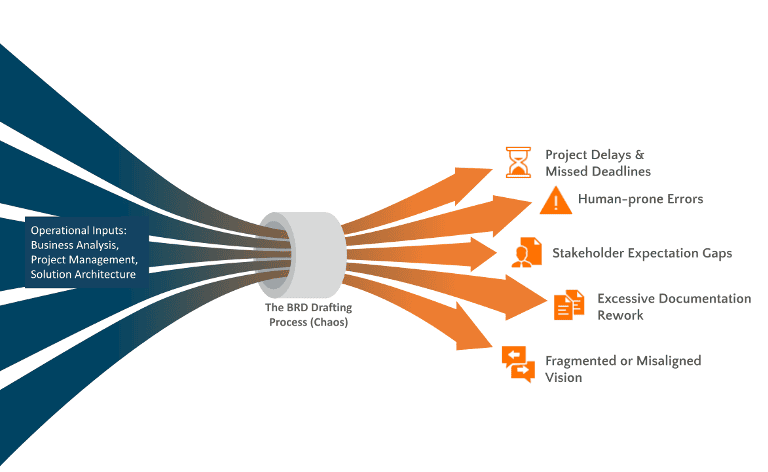
The Enterprise Documentation Bottleneck: Operational inputs from business analysis, project management, and solution architecture get constricted in the chaotic BRD drafting process, leading to severe downstream consequences like project delays, human errors, and misaligned stakeholder visions.
Core Business Units (CBUs) are focused on business outcomes, not technical documentation. As a result, they rarely submit perfectly formatted, easily digestible technical requirements. Instead, engineering teams are bombarded with a fragmented, disorganized mess of fragmented emails, scattered meeting notes, and dense Excel spreadsheets. Synthesizing this corporate noise into a structured, professional, and actionable BRD is a massive operational bottleneck. It drains thousands of highly paid engineering hours annually, frustrates stakeholders with endless back-and-forth clarification loops, and delays critical time-to-market.
Furthermore, this manual process suffers heavily from "Corporate Amnesia." When human beings are forced to write 40-page documents from scratch, they inevitably take shortcuts. New project teams completely ignore existing compliance standards, forget to include mandatory security checklists, or fail to leverage past architectural blueprints. They constantly reinvent the wheel or lack the domain knowledge to apply business best practices, introducing unnecessary risks to the enterprise ecosystem.
To completely eliminate this friction, we set out to build a fully serverless, autonomous AI-powered BRD Generator natively on AWS. Our mission was ambitious but clear: transform raw, high-level project wishes into an enterprise-grade, standardized, and fully audited Microsoft Word document using the cutting edge of Generative AI. What started as a straightforward exploration of Large Language Models quickly evolved into a rigorous masterclass in AWS-native architecture, forcing us to bridge the massive gap between raw AI outputs, strict enterprise formatting, and uncompromising user latency expectations. Before we even began building, however, it became clear that this wasn't just about generating BRDs; it was the foundational step for automating all future enterprise project documentation through AI.
Overcoming LLM Limitations with RAG
When executives first hear about Generative AI, they often assume you can simply drop a prompt into a standard, out-of-the-box Large Language Model (LLM) and instantly receive a perfect enterprise document. However, the reality is far more complicated. If you ask a foundational model to write a BRD, it will confidently generate a beautiful, highly articulate, and absolutely useless document.
Standard LLMs suffer from two fatal flaws in an enterprise context:
First, they hallucinate when pushed for highly specific technical details. Examples include inventing fake ISO standards or non-existent system dependencies.
Second, and more importantly, they lack your proprietary corporate context. A generic model does not know your internal Service Level Agreement (SLA) targets, your specific data governance policies, your preferred cloud deployment patterns, or the historical context of your legacy systems.
To make our application actually useful and trustworthy, we had to securely anchor the AI’s reasoning strictly to our internal corporate data using Retrieval-Augmented Generation (RAG). We realized early on that "knowledge" in an enterprise is highly segmented. To manage this, we architected our RAG foundation with a strict folder division in our S3 buckets, deliberately separating "Application Knowledge" from "Project Knowledge." This way, when AI queries the knowledge base, it is able to query with accuracy and with more contextual relevance.
We also realized that forcing users to start from a blank chat interface often paralyzes them. To combat this issue, we engineered a comprehensive "Smart Start" experience. We built a dedicated Prefill Document Agent. Users can upload their rough, unstructured draft PDFs, early-stage statements of work, or even raw meeting transcripts. With a click of a button, AI reads these unstructured documents and autonomously extracts the underlying intent to perfectly pre-fill our application's guided 10-step project questionnaire. From there, whenever the AI is tasked with generating formal requirements, it doesn't just guess; it actively queries our centralized library of internal Knowledge Bases to ensure the output strictly aligns with established company standards. This transforms the AI from a creative writer into a bounded, compliance-driven enterprise assistant.
Architecture Overview: The AWS-Native GenAI Pipeline
To build a platform that could scale across an enterprise while satisfying strict corporate security and compliance mandates, we strictly separated our user-facing frontend from our AI processing layer. It could be conceptualized using a "Restaurant" architectural model: the Streamlit web application is the public "Dining Room" where orders are taken, and the AWS Bedrock ecosystem is the secure, restricted "Kitchen" where the heavy lifting occurs.
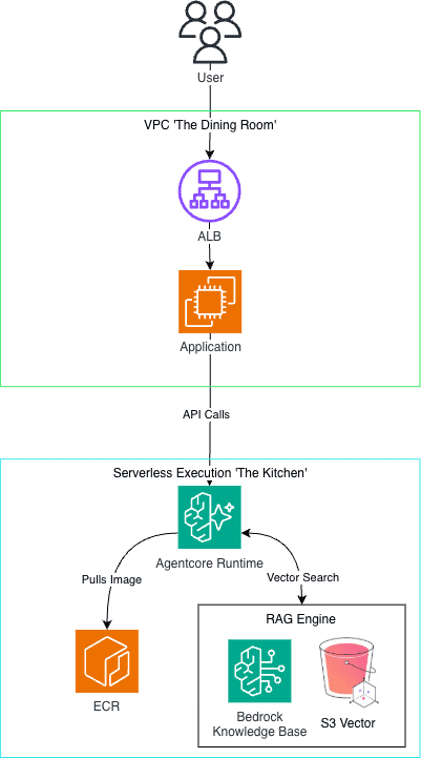
Frontend/Backend Visual of the Application.
The entire user journey is orchestrated seamlessly across decoupled AWS services:
1. The User Request: A user securely logs into our lightweight, interactive web application built with Streamlit. This frontend is containerized via Docker and hosted on a robust Amazon EC2 instance - deliberately chosen over Fargate/ECS for a predictable and low traffic demo workload like this one.
2. Secure Routing: All user traffic is securely routed, balanced, and managed via an Application Load Balancer (ALB) operating within a locked-down Virtual Private Cloud (VPC). No user interacts directly with the backend infrastructure.
3. The AI Hand-off: When the user initiates a GenAI action—whether it's prefilling a document, asking for feedback, or generating the final BRD—the Streamlit app packages the request context and fires an API call to a specific Amazon Bedrock AgentCore Runtime ARN.
4. Serverless Execution: The serverless Bedrock environment acts as the compute layer. When triggered it pulls the designated Docker image containing our agent code securely stored in Amazon ECR, spins it up into an ephemeral container, executes the complex LLM reasoning and RAG retrieval, formats the output, and returns the structured payload back to the UI.
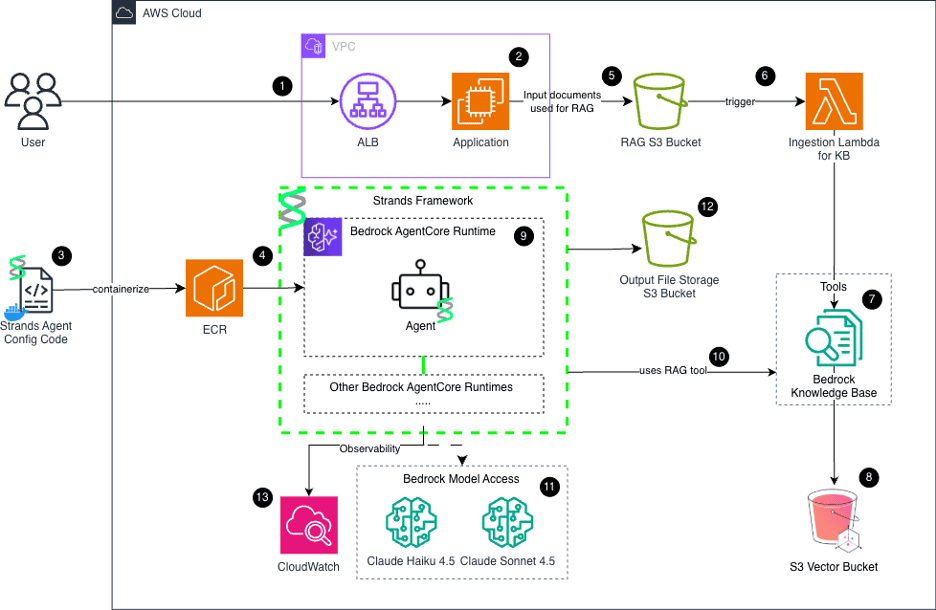
AWS-Native GenAI BRD Generator Architecture.
- Application Load Balancer (ALB): Securely handles HTTPS ingress and routes user traffic into the locked-down VPC.
- Streamlit Frontend (EC2): A decoupled compute layer hosting the user interface, file uploads, and Jinja2 document templating.
- Agent Containerization (Docker): Packages the Strands AI orchestration code, personas, and tools into an immutable Docker image.
- Amazon ECR: A secure container registry that stores the agent image for the Bedrock AgentCore runtime to pull on demand.
- RAG Source Bucket (S3): Securely stores user-uploaded enterprise documents organized strictly by domain prefixes.
- Event-Driven Trigger (Lambda): A lightweight, asynchronous function instantly triggered by S3 object creation events.
- Automated KB Ingestion: The Lambda triggers a Bedrock sync job to extract, chunk, and embed the new document text using Titan Embed V2.
- Amazon S3 Vectors: A serverless, highly cost-effective vector database for storing the high-dimensional document embeddings.
- Bedrock AgentCore Runtime: The serverless engine that executes the Strands framework to autonomously manage agent loops, memory, and tasks.
- RAG Retrieval Tool: A custom boto3 tool that allows the Strands agent to natively query the Knowledge Base for proprietary corporate context.
- Foundation Models (Amazon Bedrock LLMs): Intelligent routing utilizes Claude Haiku for fast data extraction and Claude Sonnet for deep, complex reasoning.
- Output Artifacts Bucket (S3): Securely stores the final generated .docx BRDs with strict server-side encryption and version control.
- Amazon CloudWatch: Provides observability by tracking agent logs, execution latency, and exact token usage for cost analysis.
Deep Dive: Building the Knowledge Base & Ingestion Pipeline
Dumping every single corporate document into one massive, unorganized vector database is a recipe for disaster. It destroys the retrieval accuracy. A financial reporting standard and a DevOps CI/CD pipeline schematic share overlapping vocabulary but have entirely different intents; they shouldn't compete in the same semantic search space.
To solve this, we architected an event-driven ingestion flow to build a highly segmented Knowledge Base Registry. We knew that administrators and project managers needed a way to manage this content without writing code or interacting directly with the AWS Console.
The Automated “Upload to Knowledge Base” Feature: To empower administrators, we designed a dedicated "Upload Documents to Knowledge Base" feature. This capability allows authorized users to take properly formatted enterprise documents (specifically PDF, DOCX, and TXT files) and select the specific category or domain they want to update (e.g., /finance, /security, /infrastructure, or simply /general). The application then intakes the document and uploads it directly to our designated S3 RAG Source Bucket under that chosen prefix. The upload triggers a pipeline where the system automatically chunks the document, generates vector embeddings, and syncs the data to the Amazon Bedrock Knowledge Base, immediately equipping the AI's retrieval toolkit with the latest corporate standards.
The Financial Constraint: The industry standard for robust enterprise RAG is often spinning up and maintaining a dedicated vector database cluster like OpenSearch or Pinecone. However, maintaining an OpenSearch cluster running 24/7 was prohibitively expensive for our specific project budget constraints. We needed a deeply integrated, serverless, pay-per-use alternative that didn't compromise on retrieval speed or accuracy.
The S3 Vector Solution: We opted to use the native Amazon S3 Vector Bucket feature, deeply integrated with Amazon Bedrock Knowledge Bases. The ingestion flow we built is highly automated and elegant:
1. An administrator uses the upload feature to drop a new standard template into the designated S3 RAG Source Bucket under their chosen prefix (e.g., s3://our-enterprise-rag-bucket/compliance-standards/).
2. This PutObject action instantly triggers an S3 Event Notification.
3. The notification fires a lightweight, specialized AWS Lambda function.
4. The Lambda parses the S3 prefix to determine the document's category and automatically triggers a Bedrock Ingestion Job routed to the corresponding, isolated Amazon Bedrock Knowledge Base.
5. During the sync, Bedrock automatically processes the document. It chunks the text (using optimal fixed-size chunks of 400 tokens with a 20% overlap to preserve context boundaries) and converts it into high-dimensional vector embeddings using the Amazon Titan Embed Text v2 model (producing 1024-dimension embeddings).
6. These vectors are then stored natively right alongside the data in the S3 Vector Bucket, instantly making the new corporate standards available for the agents' context retrieval.
Battling S3 Vector Metadata Limits: Before diving into the error we encountered, it is crucial to understand how RAG actually manages metadata to prevent the AI from pulling old, deprecated data. When an administrator uploads a revised document to the S3 source bucket, the ingestion job doesn’t just add new vectors and create duplicates. Instead, it relies on the metadata tags– more importantly, the unique x-amz-bedrock-kb-source-uri—to map the new vectors to the existing file. This ensures cleanly overwritten vector embeddings, keeping the AI’s context strictly up-to-date and prevents it from hallucinating outdated compliance rules.
Building on the bleeding edge of cloud technology always comes with immense risks. During the preview phase, official L2 CDK constructs were not immediately available. To fill this gap, we relied on community-driven alternatives like the cdk-s3-vectors library, published in August of 2025. Right around early October, our multi-agent prototyping and RAG ingestion were running smoothly. However, by late-November, as we pushed heavier, more complex enterprise PDFs into our pipeline, our S3 vector bucket stopped working completely. The specific community S3 Vector library construct we were utilizing in the AWS Cloud Development Kit (CDK) began to critically fail.
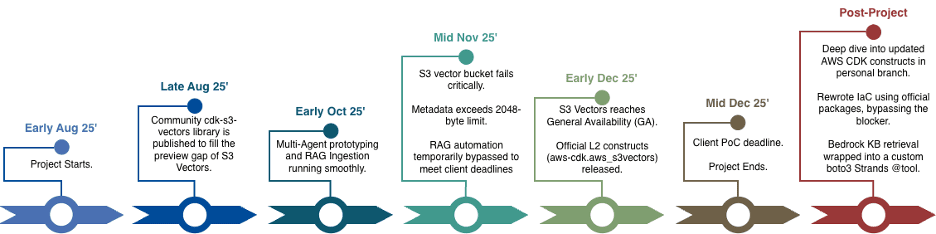
Project Timeline (Aug - Dec 2025) showing the S3 Vector construct deprecation issue.
At first, the issue manifested as a bizarre sync warning in the Bedrock console. When uploading a PDF to our data source and syncing to the general Knowledge Base, the ingestion job would fail with a brutal, cryptic error log:
Invalid record for key 'e9831cc7-8eed-43a7-9987-07acfbbb8c17': Filterable metadata must have at most 2048 bytes (Service: S3Vectors, Status Code: 400, Request ID: d920bf0c-daf2-42ac-b515-377ffbe92b77) (SDK Attempt Count: 1). Call to Amazon S3 Vectors did not succeed.
We dove deep into the architectural specs. Our setup used Titan Text Embeddings v2 generating 1024-dimension float vector embeddings using a cosine distance metric, targeting our S3 vector index.
What was the root cause you ask? A hard system limit. During the Bedrock automated chunking process, the system extracts document metadata (headers, file paths, custom attributes, etc.). When dealing with large enterprise PDFs, this extracted metadata easily exceeded the strict 2048-byte limit enforced by the native Amazon S3 Vectors service. Because the payload was too large, the S3 Vectors API threw a Status Code: 400 Bad Request, entirely halting the ingestion pipeline.
We frantically searched for a solution. We found discussions on AWS re:Post and a specific GitHub pull request in awslabs that addressed this exact "big metadata error" by aggressively truncating metadata payloads before embedding.
However, implementing this fix would have required us to fork and patch the underlying AWS CDK constructs. With the client PoC deadline looming over us, we did not have the luxury of time. We had to make the painful decision to temporarily bypass the full RAG automation in the primary branch just to keep our core agent orchestration and Streamlit UI work moving forward.
But we absolutely did not abandon the feature. Even after the project officially ended, we were determined to see this through. Once S3 Vectors reached General Availability in early December, official L2 constructs were integrated into the AWS CDK framework. Working in a personal development branch, we dove deep into the updated architecture.
After intense troubleshooting, we successfully bypassed the S3 vector metadata blocker by utilizing the new aws_cdk.aws_s3vectors package to explicitly filter out the bloated metadata keys that were exceeding the 2048-byte limit.
Here is the exact CDK implementation that saved our RAG ingestion pipeline:
# 1. Provision the native S3 Vector Bucket
s3_vector_bucket = s3vectors.CfnVectorBucket(
self,
"S3VectorBucket",
vector_bucket_name=f"brd-vectors-{self.account}-{self.region}"
)
# 2. Define the Vector Index with critical metadata filtering s3_vector_index = s3vectors.CfnIndex(
self,
"BrdVectorIndex",
vector_bucket_arn=vector_bucket_arn,
index_name="brd-vector-index",
data_type="float32",
dimension=1024,
distance_metric="cosine",
metadata_configuration=s3vectors.CfnIndex.MetadataConfigurationProperty(
non_filterable_metadata_keys=[
'AMAZON_BEDROCK_TEXT',
'AMAZON_BEDROCK_METADATA',
'text',
'bedrock-knowledge-base-default-metadata',
'x-amz-bedrock-kb-source-uri'
] # CRITICAL: This explicit filtering prevents the 2048-byte crash!
)
)
# Ensure index is created after bucket
s3_vector_index.add_dependency(s3_vector_bucket)
# 3. Connect to the Bedrock Knowledge Base
kb = bedrock.CfnKnowledgeBase(
self,
"GeneralKnowledgeBase",
name="general-kb",
role_arn=kb_role.role_arn,
knowledge_base_configuration=bedrock.CfnKnowledgeBase.KnowledgeBaseConfigurationProperty(
type="VECTOR",
vector_knowledge_base_configuration=bedrock.CfnKnowledgeBase.VectorKnowledgeBaseConfigurationProperty(
embedding_model_arn=f"arn:aws:bedrock:{self.region}::foundation-model/amazon.titan-embed-text-v2:0"
)
),
storage_configuration=bedrock.CfnKnowledgeBase.StorageConfigurationProperty(
type="S3_VECTORS",
s3_vectors_configuration=bedrock.CfnKnowledgeBase.S3VectorsConfigurationProperty(
vector_bucket_arn=vector_bucket_arn,
index_name="brd-vector-index"
)
)
)
With the backend infrastructure finally stabilized and securely controlled via IAM, we needed to ensure this Knowledge Base could actually be consumed by our AI agents. Instead of building complex API Gateways or external orchestration servers, we used boto3 to wrap the Bedrock Knowledge Base retrieval logic into a custom Python function. By formatting this as a callable tool, we essentially created a direct, serverless bridge between our data foundation and the future "brain" of our application.
This grueling experience proved that while specific framework constructs may deprecate and break, fundamental cloud engineering resilience perseveres.
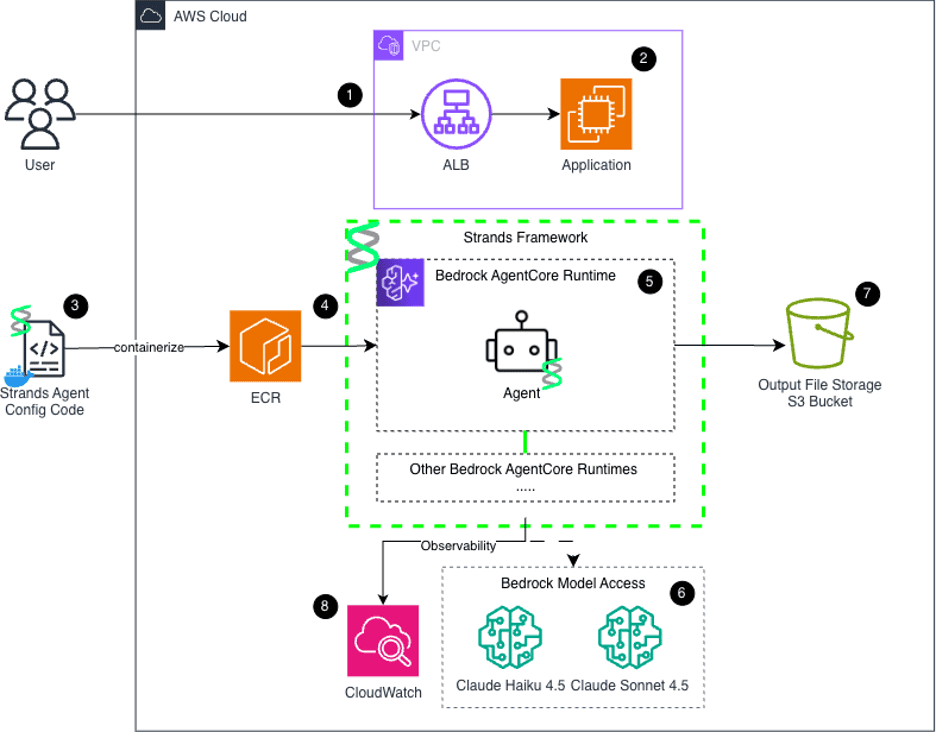
Final AWS Architecture including RAG Pipeline.
Looking Ahead
With our infrastructure stabilized and our Knowledge Base pipeline successfully bypassing the S3 vector metadata limits, we finally had a secure, automated data foundation. But data is useless without a brain to process it.
In Part 2 of this series, we will dive into the actual AI orchestration—how we built a multi-agent team using the Strands framework, the agonizing architectural pivot we had to make to meet a strict 1-minute SLA, and how we secured the entire platform for enterprise compliance. Stay tuned.