Insight
2026-07-20
(Part 2) Architecting an Autonomous Business Requirement Document Generator on AWS: Multi-Agent Orchestration, SLAs, and Enterprise Security
Authored by: Scott Weber, MegazoneCloud CTO, and Katie Kim, MegazoneCloud Associate Cloud Engineer
In Part 1, we explored the massive bottleneck of enterprise project intake and detailed how we built a serverless, event-driven Knowledge Base ingestion pipeline on AWS—surviving a midway CDK deprecation along the way. With the RAG foundation laid, we needed to engineer the 'brain' of the application to actually write the Business Requirement Documents. Here is how we orchestrated our AI agents, navigated strict latency SLAs, and secured the platform.
5. Deep Dive: Multi-Agent Orchestration with Bedrock AgentCore
The most fascinating part of this build was engineering the "brain" of this application. To achieve this natively on AWS, we utilized the Strands Agents framework.
For those unfamiliar, Strands (awslabs/strands-agents) is a lightweight, open-source AI agent orchestration framework built natively for Amazon Bedrock Agentcore. Unlike heavy, cycle-based graph frameworks (like LangGraph) that require developers to manually manage complex state loops and conversational memory, Strands takes a seamless “model-driven” approach. You simply provide the AI with a defined persona and a set of callable and easily configurable tools, and the framework natively handles the execution loops, memory persistence, and tool routing entirely serverless on Bedrock.
Crucially, Strands allowed us to utilize the boto3 retrieval tool we staged at the end of Part 1. Rather than complicating our infrastructure with an AgentCore Gateway, we took a purely code-first approach. Because our agent execution role already had IAM permissions for bedrock:Retrieve, we simply wrapped a native boto3 call inside a Strands @tool decorator.
Here is a look at the exact Python implementation we used to allow our Strands agent autonomous access to query the Knowledge Base:
# agents/kb_tools.py
import boto3
from strands import tool
import os

# Initialize the native Bedrock Agent Runtime client
bedrock_agent_client = boto3.client('bedrock-agent-runtime')
KB_GENERAL_ID = os.environ.get("KB_GENERAL_ID")

@tool
def query_knowledge_base(query: str, max_results: int = 5) -> str:
    """Query the general knowledge base for relevant information about business requirements and best practices."""
    try:
        # Direct native boto3 call
        response = bedrock_agent_client.retrieve(
            knowledgeBaseId=KB_GENERAL_ID,
            retrievalQuery={'text': query},
            retrievalConfiguration={
                'vectorSearchConfiguration': {
                    'numberOfResults': max_results
                }
            }
        )
        # Format and return the extracted RAG context directly to the agent
        return format_kb_results(response)
    except Exception as e:
        return f"Error querying knowledge base: {str(e)}"
With the agents enriched with enterprise context, our initial vision was to replicate a real-world enterprise team by designing a highly complex multi-agent orchestration graph natively implementable through Strands, delegating specific tasks to specialized AI personas.
The Multi-Agent Dream: Originally, we implemented a sophisticated "fork-join" architecture. When a user clicked "Generate BRD," the structured data from the project questionnaire fanned out simultaneously to three parallel agents:
- The Solutions Architect Agent: Tasked with mapping project scope, logistics, and out-of-bounds constraints.
- The Business Analyst Agent: Tasked with defining critical user stories, identifying stakeholders, and mapping user flows.
- The Technical Architect Agent: Tasked solely with evaluating deep non-functional and technical requirements (NFRs) like system latency, API security, and database redundancy.
A final Writer Agent waited for all three to finish, consumed their deep analyses as context, and synthesized the final document. The BRDs produced by this multi-agent graph were nothing short of spectacular—they were deeply nuanced, incredibly thorough, and truly expertise-grade.
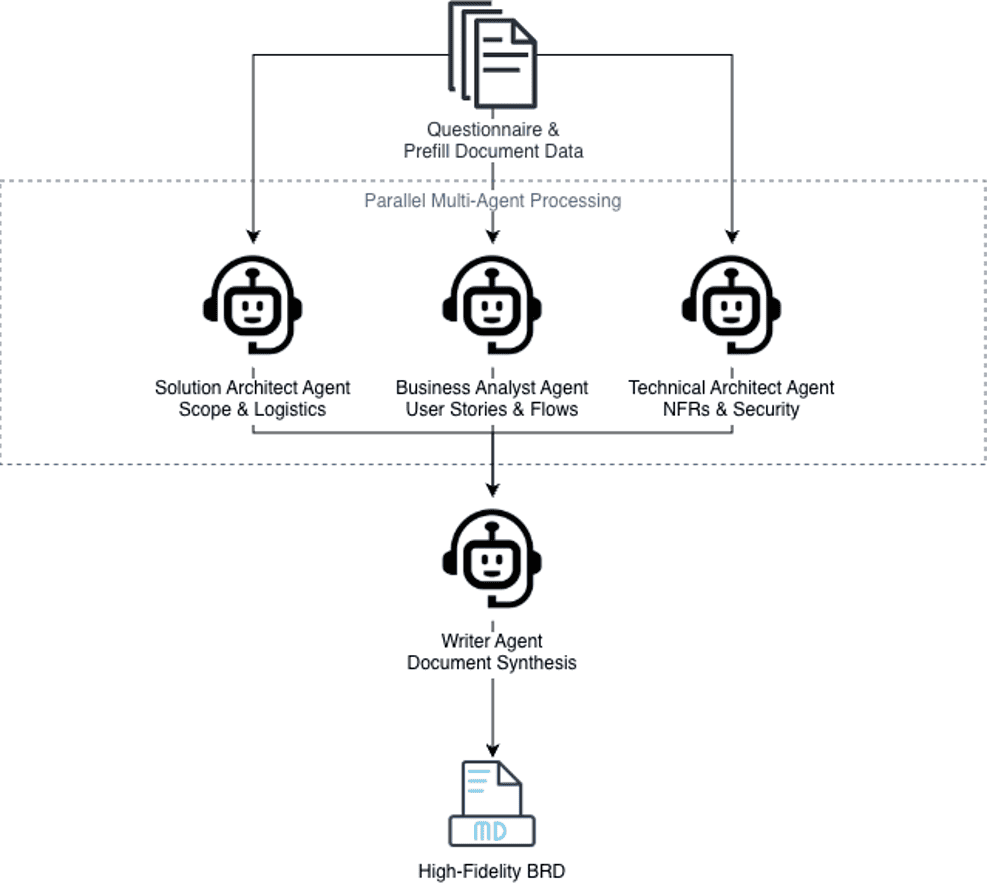
Initial multi-agent Strands graph orchestration architecture.
The Production Pivot (The 1-Minute SLA): However, we quickly hit a wall. This multi-agent graph took anywhere from 6 to 15 minutes to execute. To be precise, this massive bottleneck was primarily due to each agent independently generating huge amounts of text, and text generation (output tokens) is inherently the most time-consuming part of the LLM inference.
We learned that for enterprise software, user experience dictates architecture. Our client tested it and mandated a strict 1-minute runtime SLA. Users simply will not sit and stare at a loading spinner for 15 minutes, no matter how good the document is. Although we suggested an asynchronous solution to the problem, the execution time was not good enough for a proof of concept.
To meet this SLA, we had to make a massive architectural pivot. We scrapped the beautiful multi-agent graph for the core document generation. Instead, we consolidated the distinct personas and prompts into one massive, highly optimized system prompt driven by a single BRD Writer Agent. This drastically reduced overhead, cutting our execution time down from 15 minutes to an incredible 30 to 60 seconds. We traded a fraction of deep reasoning quality for a massive improvement in speed—a classic GenAI engineering compromise.
Micro-Agents and Model Routing: While we moved to a single agent for the main BRD generation, we fully retained our specialized micro-agents for the rest of the application's lifecycle, utilizing intelligent model routing based on task complexity:
Prefill Agent (Claude Haiku): Reads user uploaded unstructured project documents and autonomously extracts the underlying intent to perfectly pre-fill the application's guided 10-step project questionnaire. We route this to Haiku for speed and low cost.
- Improve & Feedback Agent (Claude Sonnet): Sits next to the 10-step questionnaire. If a user's input is vague, it provides instant, professional rewrites. We route this to Sonnet for deep and logical yet fast reasoning.
- Impact Analysis Agent (Claude Sonnet): Acts as a "What If" calculator. After generation, users can propose a change (e.g., "What if we add SSO?"), and this agent calculates the ripple effects on budget and scope.
Commenting AI Agent (Claude Sonnet): After the .docx data is generated, the UI opens a simple CRUD interface where users can manually edit text blocks and leave stakeholder comments. The Commenting AI reads the human comments (e.g., "Make this security section stricter") and automatically drafts updated document revisions for the author to accept or reject, dramatically speeding up the review cycle.
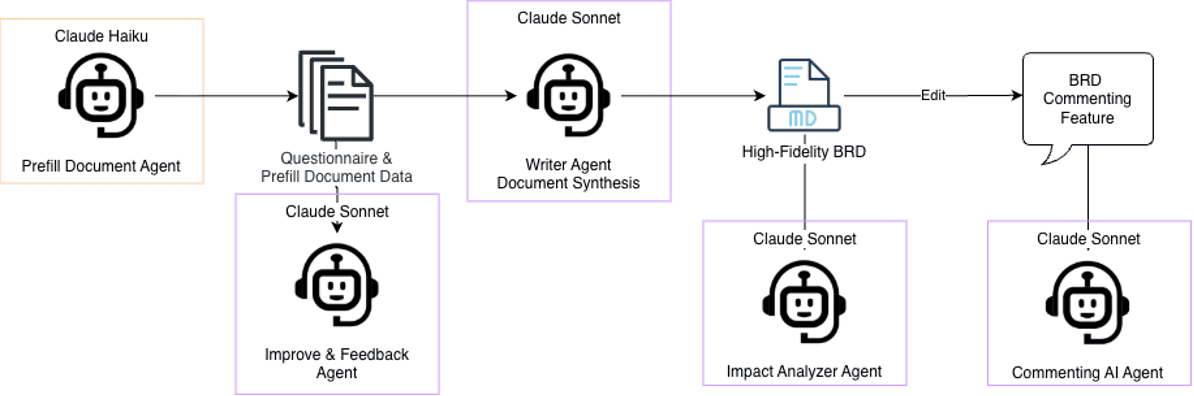
Application flow + modular agent architecture.
Jinja2 Templating & Output Formatting: One of the biggest challenges in GenAI is bridging the gap between raw AI Markdown and a strictly formatted corporate Microsoft Word document. Business stakeholders do not want to read constantly differing Markdown; they want a polished document with headers, signature blocks, and EARS-compliant requirement tables.
To solve this, we used docxtpl (Jinja2 for Microsoft Word). We started by mapping our corporate BRD format with Jinja2 tags (e.g., {{ project_name }}) and table placeholders.
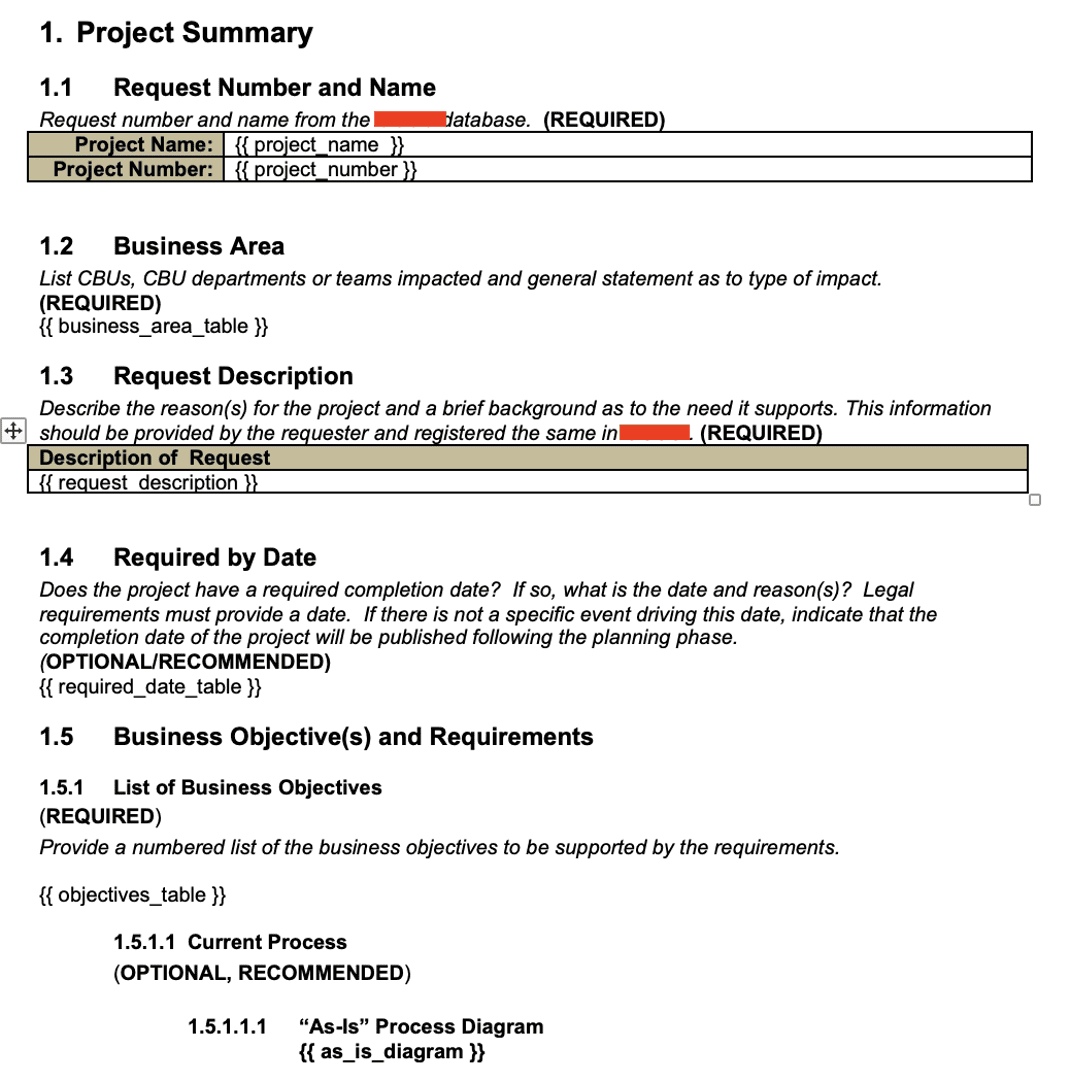
Jinja2 BRD Word template.
Next, we engineered our BRD Writer to output its final analysis strictly as a deeply nested JSON payload designed to match this template perfectly. Here is an example of the highly structured system prompt we used to force the model's compliance:
writer_agent_system_prompt = {
	"""
**MANDATORY OUTPUT FORMAT - MUST BE VALID JSON:**
   	 ```json
    	{
      	"project_number": "Generate format like 'PROJ-2026-001'",
      	"last_updated": "This will be automatically set to current date",
      	"as_is_diagram_mermaid": "Create Mermaid flowchart syntax for current process (see MERMAID FORMAT below)",
      	"as_is_diagram_text": "Text description of current process as fallback (numbered: 1. Step one 2. Step two)",
 	"business_reqs": [
     	   {"id": "BR-01", "req": "Business requirement in EARS syntax", "prio": "High/Medium/Low"}
     	 ],
	...
}
```
**MERMAID FORMAT FOR PROCESS DIAGRAMS:**

    Create simple, clear Mermaid flowcharts using this format:

    **AS-IS Diagram (Current Process):**
    ```
    graph TD
        A[Start: Actor/Trigger] --> B[Step 1: Action]
        B --> C[Step 2: Action]
        C --> D{Decision Point?}
        D -->|Yes| E[Path A]
        D -->|No| F[Path B]
        E --> G[End Result]
        F --> G

        style A fill:#f99,stroke:#333
        style G fill:#9bf,stroke:#333
    ```
**CRITICAL RULES:**
    - Your entire response must be valid JSON
    - Do not include any text before or after the JSON
    - Escape all quotes and newlines properly in JSON strings (use \\n for newlines, \\" for quotes)
    - Use the EXACT project information provided in the payload (cbu_department, project_title, owner_name, author_name)
    - Extract other data from user inputs, don't use placeholder text
    - Use EARS syntax for all requirements
    - Create specific, detailed Mermaid diagrams based on user input
	"""
}
Once the agent returns this JSON, our Python script programmatically iterates through it. Simple variables are injected instantly, and for complex arrays like functional requirements, the script generates perfectly sized Word tables on the fly:
   def _generate_subdocuments(self, doc: DocxTemplate, json_data: Dict[str, Any]) -> Dict[str, Any]:
	"""Generate all table subdocuments."""
        subdocs = {}
	# Business Area
        subdocs['business_area_table'] = doc.new_subdoc()
        self.create_table(subdocs['business_area_table'], ["Business Area", "Description of Impact"],
                         json_data['business_areas'], ["area", "impact"],
                         widths=[1.31, 4.35])
	return subdocs
As a final safety net, we built a massive regex cleaner into our Python generator to aggressively scrub any leftover AI hallucination tags before the data hits the Word document. The result is a flawless, enterprise-ready document generated in under 60 seconds.
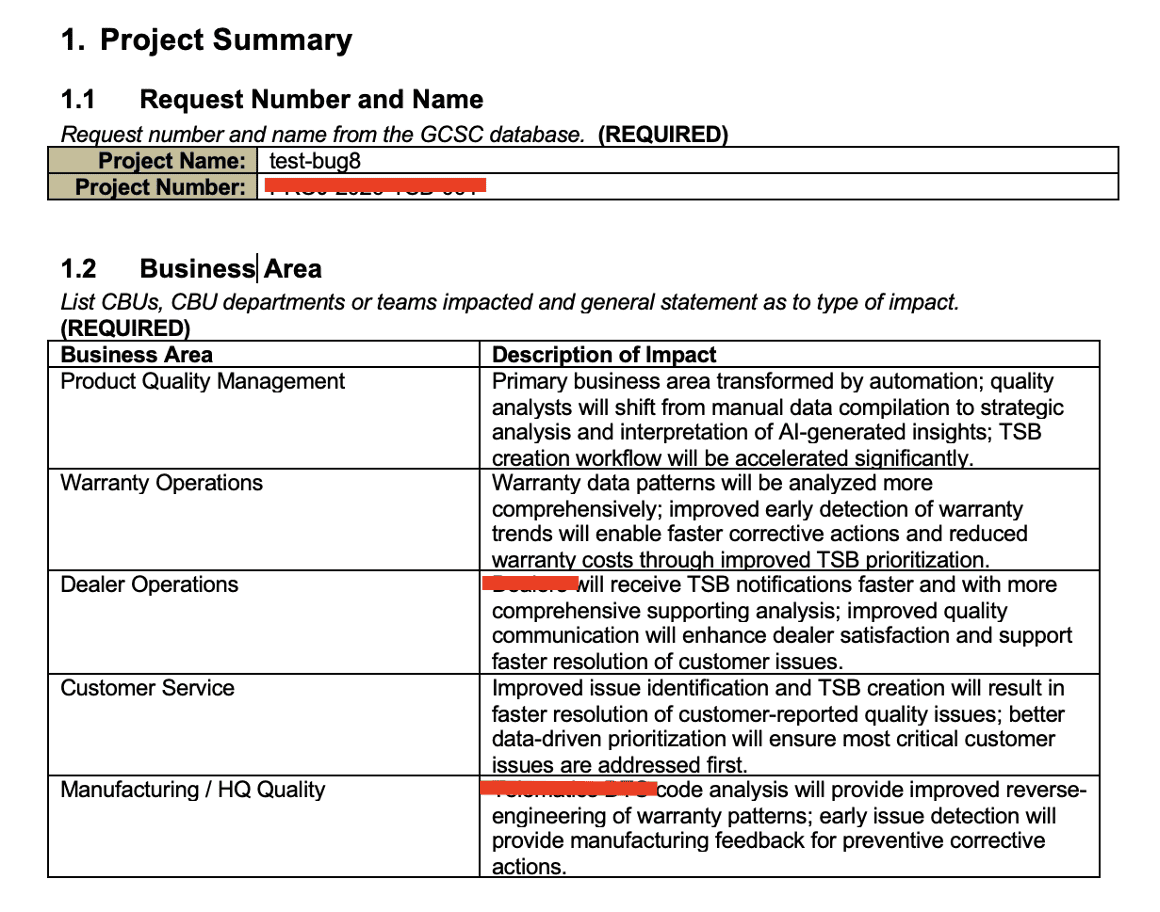
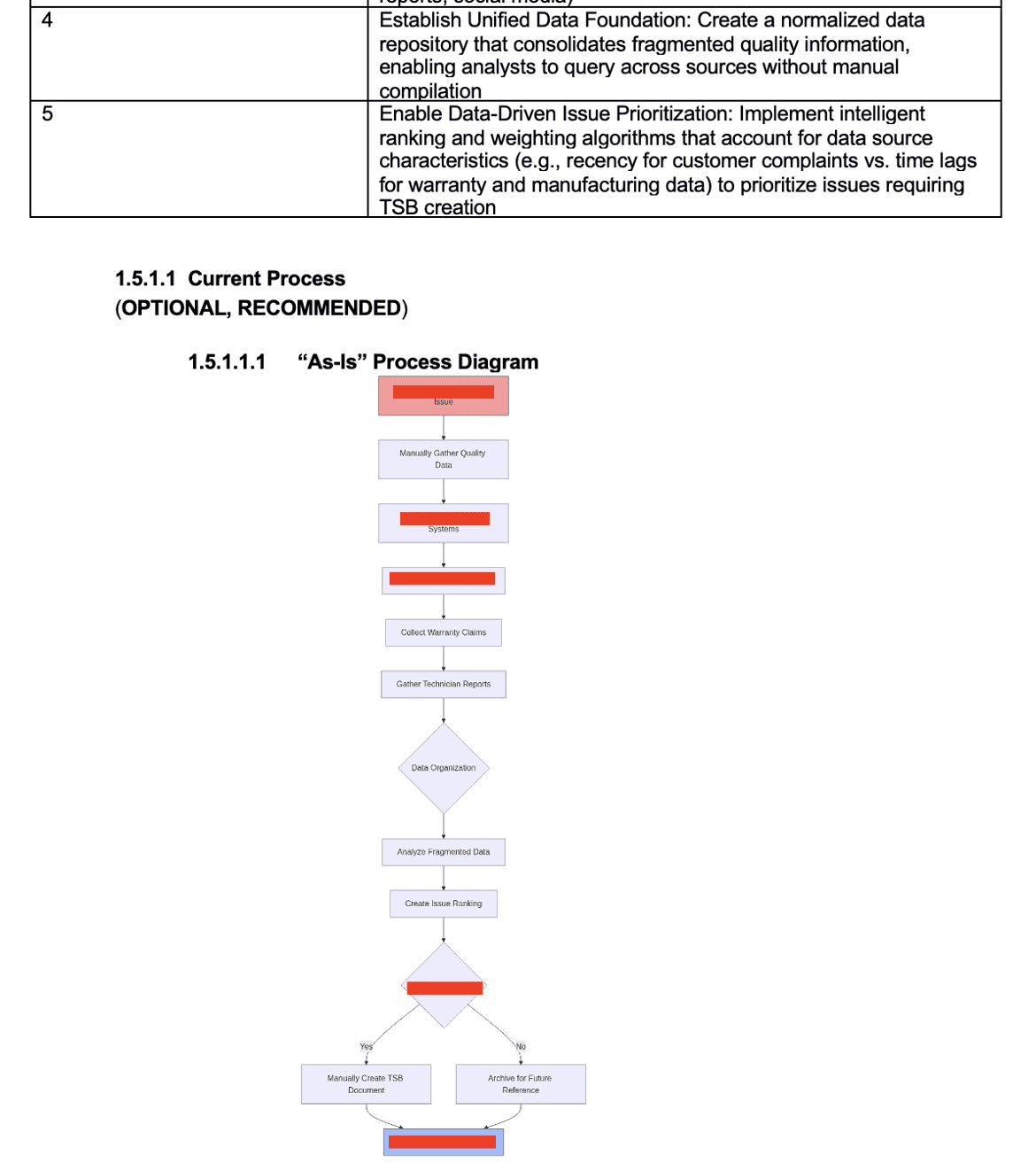
Final standardized docx document with populated tables and formatting.
6. Enterprise Security, Auditability, and Observability
Deploying Generative AI in a heavily regulated enterprise requires absolute, verifiable proof that corporate intellectual property is secure and that cloud infrastructure costs are strictly controlled. Our AWS-native architecture protects corporate data at every single layer of the stack.
Network Isolation and Routing: The entire application ecosystem lives within a dedicated Virtual Private Cloud (VPC). User traffic is securely routed through the ALB over HTTPS, ensuring that direct access to the underlying EC2 instances or the Docker containers is completely impossible from the public internet.
The Digital Bouncer (Bedrock Guardrails): We simply cannot trust that users won't accidentally paste sensitive data into the LLM, nor can we trust the LLM to never leak training data. Before any user prompt reaches the foundation models, and before any generated output reaches the user's screen, it passes through Amazon Bedrock Guardrails. We configured this "Digital Bouncer" to aggressively detect, scrub, and block over 30 types of Personally Identifiable Information (PII) and sensitive health data, ensuring it never enters the model's processing layer.
Secure Artifact Storage: The final .docx files generated via our Jinja2 templating process are not kept in ephemeral memory. They are saved directly to a designated, highly secure Amazon S3 bucket. This bucket enforces strict server-side encryption (SSE-S3) at rest, and has object versioning enabled to prevent accidental deletion and to maintain a perfect audit trail of document iterations.
Complete Lifecycle Observability: Generative AI costs can spiral out of control if left unmonitored. We built custom Python tracking utilities to log the exact input token usage, output token usage, latency, and agent invocation counts for every single interaction. This rich telemetry data is streamed directly to Amazon CloudWatch. We then built a custom Streamlit "Cost Calculator" dashboard that queries these CloudWatch logs, giving the client total lifecycle tracking and complete, granular transparency into their exact AWS spend per BRD generated.
7. Lessons Learned & AWS Well-Architected Alignment
Bringing this complex architecture from a whiteboard concept to a deployed, production-ready AWS asset surfaced several critical developer friction points and forced us to innovate on the fly.
Prompt Engineering for JSON Strictness: The only reliable way to pass context from a non-deterministic LLM into a deterministic Python Jinja2 template was by commanding the model to output strictly structured JSON. However, LLMs naturally want to be conversational. Fine-tuning the system prompts to absolutely prevent the LLM from outputting conversational preamble (e.g., "Sure, here is your JSON payload for the BRD...") before the actual JSON object was a massive hurdle. It required rigorous prompt engineering, utilizing XML tags for structure, and implementing fallback regex parsing in our Python backend to extract the JSON safely.
Aligning with the AWS Well-Architected Framework:
Operational Excellence: We fully embraced Infrastructure as Code (IaC). Everything, from the Bedrock Agents to the Lambda functions and VPC routing, is defined using AWS CDK. This allowed us to iterate rapidly and recover quickly from the S3 Vector deprecation issue. Furthermore, our deep integration with CloudWatch ensures we have full operational visibility.
- Performance Efficiency: Our agonizing pivot from a 15-minute, highly reasoning-capable multi-agent graph to a 30-second single-agent generation perfectly illustrates the tension between AI capability and application performance. We had to relentlessly optimize our prompting architecture to align with user latency expectations, proving that performance efficiency sometimes means pulling back on architectural complexity.
Cost Optimization: By migrating away from an always-on OpenSearch cluster to event-driven S3 Vectors, and relying entirely on Bedrock AgentCore instead of provisioning expensive, idle GPU EC2 instances, we drastically lowered the operational floor cost of the application. We utilized intelligent model routing (Haiku vs. Sonnet) to ensure we only pay for deep reasoning when absolutely necessary, keeping our per-document cost incredibly low.

8. Conclusion
The industry is rapidly shifting away from simple, conversational chatbots toward autonomous, task-oriented AI Agents that actually execute complex workflows. By combining the serverless execution power of Amazon Bedrock AgentCore, the cost-effective semantic retrieval of S3 Vectors, and the robust code-first logic of the Strands framework, we successfully built an intelligent documentation engine that fundamentally changes how projects begin.
This AWS-native architecture accelerates business value by turning days of chaotic, manual requirement gathering, endless email chains, and tedious formatting into a guided, 30-second automated workflow. Crucially, by leveraging strict VPC network isolation, Bedrock Guardrails for PII scrubbing, and Jinja2 templating for enterprise consistency, we achieved this massive increase in velocity while maintaining the absolute security boundaries and presentation standards required by modern enterprise IT.